 Fix My Wi-Fi
The problem it solves
The Wi-Fi icon says you're connected. The browser says you aren't. Sound familiar?
When that happens, the fix is usually the same handful of steps a technician would run: clear the DNS cache, get a fresh address from the router, reset the network software, restart the adapter. Each one is a command most people have never typed and shouldn't have to look up while they're offline.
Fix My Wi-Fi bundles those steps into one file. Think of it as the checklist the help desk would walk you through on the phone, minus the hold music.
How it works
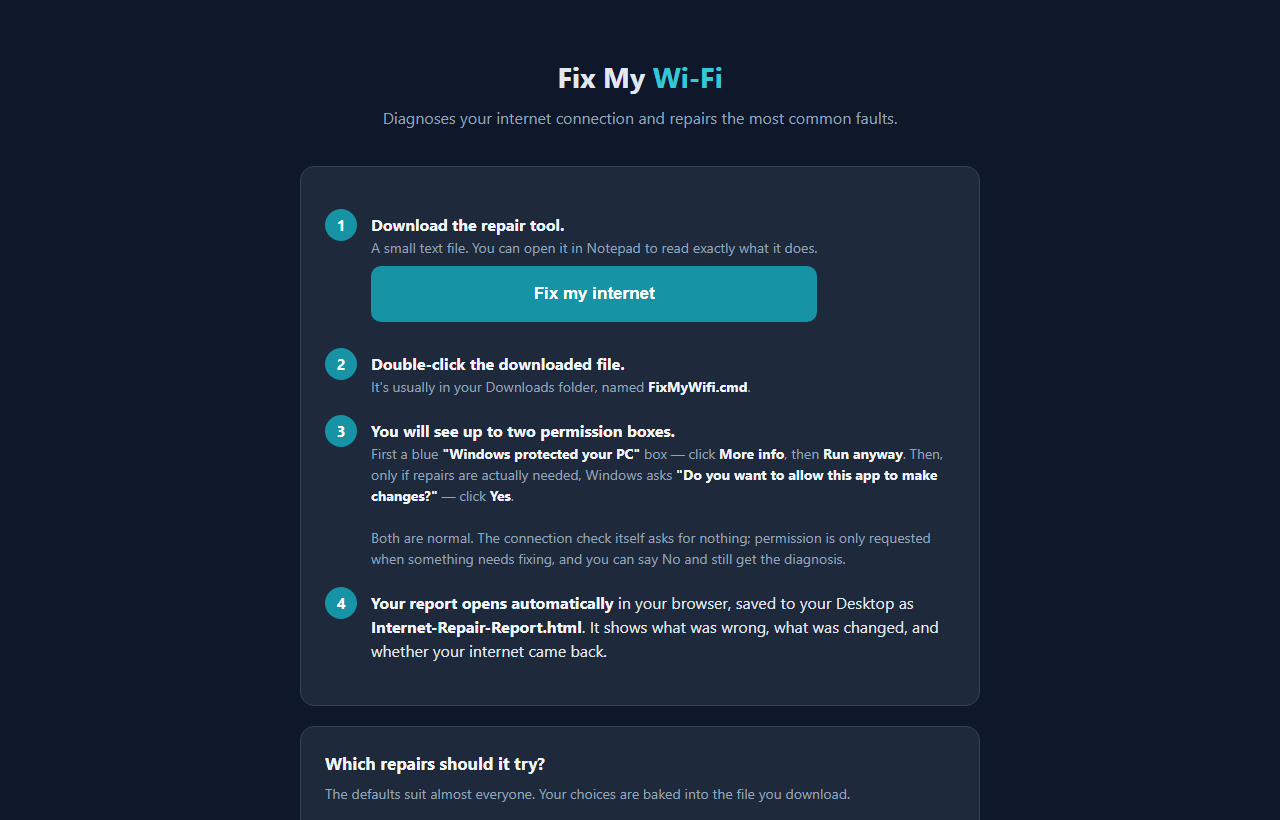
- Pick your repairs. On the page, tick which fixes it's allowed to try. The defaults suit almost everyone. Your choices are baked into the file you download.
- Download and double-click. You get a small file called FixMyWifi.cmd. Windows shows a blue "Windows protected your PC" box because the file is free and unsigned. Click More info, then Run anyway.
- It checks first. The connection check needs no special permission. If your internet is working, it stops there and just reports.
- It repairs only if needed. If something is broken, Windows asks "Do you want to allow this app to make changes?" Say yes and it runs the repairs. Say no and you still get the diagnosis.
- Read the report. It opens in your browser and is saved to your Desktop as Internet-Repair-Report.html: what was wrong, what changed, and whether your internet came back.
What the repairs do
Clear the DNS cache makes Windows forget stale website addresses. Harmless. Get a fresh address from the router fixes the most common "connected but no internet" fault. Reset the network software layer (Winsock) cleans up damage left behind by removed VPNs and antivirus tools. Reset the TCP/IP stack returns Windows networking to its factory state. Restart the network adapter touches only the physical adapter you're using, and leaves VPN and virtual adapters alone.
Two options are off unless you turn them on: switching your DNS to 1.1.1.1 (it replaces your current DNS servers), and looking up your public IP address, which is the only time the tool contacts the internet at all.
The Winsock and TCP/IP resets only finish after a restart. The report tells you that honestly instead of claiming the job is done.
Safe to run? Read it first
The download is a plain text file. Open it in Notepad and you can read every line before you run it. There's also a Show me exactly what this runs link on the page.
On a work computer, a network reset can wipe settings your IT department set up, like a fixed IP address, specific DNS servers, or a proxy. The tool checks for all of those, plus whether the PC is joined to a company domain, and warns you. If you see those warnings, talk to IT first.
Why I ask for your email
The tool itself runs entirely on your computer. Nothing about your connection or your report is uploaded, and nothing gets installed. Your name and email are the only things this site keeps, and they're what lets you into the download page.
I might send you a note now and then about other free tools I build. I will never sell or give your email to anyone else.
Questions people ask
Is it free?
Yes. No trial, no upgrade, no ads.
My PC has no internet. How do I get the file onto it?
Download it on a phone or another computer and copy it across on a USB stick. The tool doesn't need a working connection to run.
Does it work on a Mac or a phone?
No. It's built for Windows PCs. Open the page on the Windows computer that has the problem.
Why does Windows ask for permission?
The blue box shows up because the file is free and unsigned. The second box only appears when repairs are needed, because fixing Windows networking needs administrator rights. You can say no to that one and still get a report.
It still says I have no internet.
Restart your computer if the report asked you to, then restart your router: unplug it, wait 30 seconds, plug it back in. If other devices in the house are also offline, the problem is your router or provider, not this PC.